
Quick Cost Comparison: Home Photos printing & Opting a Printing Service

With the increasing cost of original cartridges, the demand for online photo printing services boosted. But, there are some people who are still in favor of home printing, they believe it’s a cheaper source than ordering on online stores like Amazon, Snapfish, and Walmart for every single printout. Is it really true? Let’s make a comparison before framing any decision.

A Smarter Way To Compare Cost

To check out the price difference between home printing and online printing service, let’s take an example of 4X6 image printing cost. There are numbers of an online printing service provider, but we stick to the top four i.e. Shutterfly, Amazon, Snapfish, and Walmart. Some of them occasionally provide a special discount to attract customers, but will not consider that offers. First one charge $0.12 for every print whereas later cost you $ 0.09 each for 4X6 size images.

On the other side, in the home printer, inkjet printers are the most popular form. If you buy branded inkjet printer like Canon Pixma IP 8720, it can produce pictures with 9600colour dpi. This will cost youalmost $180. Canon Pixma IP 8720 printer model is well-known for budget-friendly nature. For cost comparison, we take a pack of a full set of ink carts, we got 780 (approx.) photos. That means for a single 4×6 size photo it cost me $0.07.

As $0.07 sounds pretty good. But to achieve this you need to buy a quality printer, glossy paper, printer inks and surely cannot print without power supply. So, if you can ignore these facts, then printing at home will be a better option.

Read More: Tips to Keep in Mind While Purchasing Printer Ink

If You Are Not Regular Printer User – Things Can Be More Expensive

This assumption is clearly based on the idea that when you are not a regular printer user. Then the cost per print will not be dropped but can be high. For instance, if you spend $75 on paper and ink to produce 20 images then the cost could be $3.75. But, if you use more printer the cost will ultimately be reduced. Canon printer cost you $180 if you take 1000 printout the cost will reduce to $0.18 per printer. That means reducing cost is a great reason to buy own printer.

So, if you are regular printer use then do not hesitate to buy own. But for occasional users, online printing services are a great deal.

You Can Gain The Benefit of Speed And Control
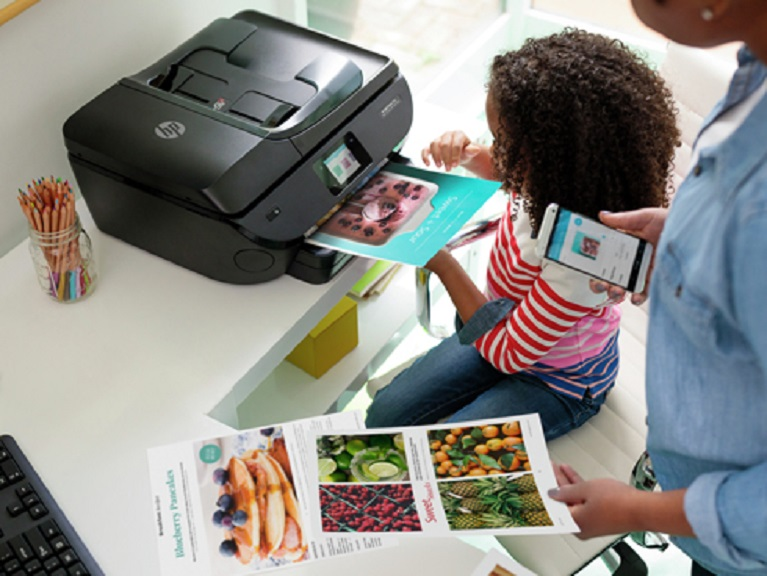
There are some aspects that weight home printing value more. At home printing, you have full-fledged control over the printer. From matter paper to glossy one, or ordinary ink to special one you have complete control. If you are not satisfied with current options you can change the present printer setting to advance level.

Additionally, printing at home is incredibly easy, simply you need to give the command from your mobile or laptop. Modern printers provide numbers of option for convenient connection, like wireless connection, app connectivity or through the wire.

With this, some people do not want to wait for a long time to print images. They want quick results. Therefore, for them acquiring one printer will be a great opportunity.

Online printing Service is Cheap and Easy to Acquire

Opting online printing services are cost-effective and easy to use. As you do not need to look for cheap printer cartridges to save a few bucks. Moreover, you don’t have to deal with a frustrating printer, ink refillings, types of paper buying and many more. Simply order on online store help you to get your pictures at your doorstep. Therefore, this eliminates the problem of sitting at home or to power on the printer before giving print outs.

On websites like Walmart, you can collect your pictures within a couple of hours from your nearest store. Otherwise, waiting for 3-5 days is enough to get pictures.

In nutshell,

Unless you are able to buy printer consumables like printer ink or printer paper at discount and be a frequent printer user, you cannot achieve the advantage of cost-cutting. Because in home printing, you have complete control over speed, settings, and material usage. It is a quick way to get images. But, if you are a rare printer user then it’s good to go with online printing service.

Tech Tips: Why Humidity is Vital For Printing

Humidity assists in breaking the ice and deliver high-quality printing results on papers. Therefore, every industry where printing is crucial cannot deny from maintaining optimum humidity level at their workplace. As per experts opinion, the desired moisture level required for printing on paper is 45-80% RH for operation and 20-85% RH for storage. If there will be less than the minimum, the printer will create issues like low-quality print results, paper jamming and sticking, ink clogging and so on. Hence, the adequate mist is required to improve printouts and saving your brother ink from wasting. Some other essential factors responsible for humidity are as follows:

  • Hygroscopic Property of Paper

The paper needs to maintain a balance between moisture and printing room environment for optimal printing. The reason behind, when the paper is manufactured, it’s 4-6% weight is due to the presence of water. During its packaging, the level of humidity changes with the room temperature where it is being stored. Therefore, at the time of printing, you need to maintain the proper moisture level in the printing room to get high-end results.

  • Importance in Digital Printing

Laser printing is widely known as xerography. It works by using intense heat and pressure to convert black carbon powder into ink. Keep in mind, when a printer is using high heat, it draws the water from the air that creates difficulty for the paper to pass through the printer. As per OEM suggestion, your paper needs 50 to 55% of Relative humidity (RH) level to keep the paper smoothly moving. If the level will not be up to the mark, it will lead to proper sticking, paper jamming, creating an issue for printer rolling, etc.

  • Offset Printing

Offset printing requires high moisture level to make proper interaction with ink, paper, and press effectively. For this, you need a high room or press hall moisture level i.e up to 55% RH. The lower will result in dry air that affects the printing process with curing, creasing and most common dot doubling. As in low moisture level, electrostatics build up most commonly which is the biggest factor for misfeeding, stacking, trimming and folding. All this happens due to paper sticking. In offset printing, the paper needs to pass through the same procedure many times, every time it changes its shape can cause cracking among the folds once finished.

  • Inkjet Printers

For inkjet printers, you need to maintain printing room temperature between 45-50% RH. This level is comparatively lower than laser printing. In inkjet printers, if you do not meet with the desired level, you will suffer from ink spreading or clogging from drying issues, etc. Importantly, printing requires an adequate environment, anything less or more affect the print quality.

How To Get Perfect Print

Printers are sensitive equipment. You need to pay adequate attention toward its all parameters to get premium-quality results. Therefore, we have sought out some basic tips for you that will provide you with fruitful printouts. Let’s discuss them:

  • Choose printer and Cartridge carefully: While buying a printer ink cartridge, it is essential to pay attention toward label. What type of brand you select has a great impact on your printing process. There are few brands that work wisely in all conditions and their ink is of superior quality ready to adjust plus and minus to some extent. For example, if you use brother ink, its best results never disappoint you.
  • Pay Attention to Paper Storage: It is essential to consider paper storage to get better results. Therefore, while storing be sure, the place must be completely dry with a 40-60% room temperature. It must be away from the window, door, and vent as there is a high humidity level in those areas.
  • Keep consumable in original packaging: Consumable like paper, ink or ink cartridge are dispatched under multi-layers of testing. Therefore, until you are going you use them don’t put them out of the packing. While storing, you can place the paper or other products on a low shelf rather than on higher racks. In addition, do not forget to read the labeled instruction for hat placing whether placing is required in a horizontal or vertical level.
  • Use Climate control devices: There are fewer brands available that supply humidity control devices, placing them in your printing area will help you to get superior results. Moreover, you will not get frustrated by ink or paper issues that occur frequently.

Finally,

It is crucial to maintain your printing area temperature for best results. Relative humidity between 40-60% is normally required. But, if you live in a place where the humidity level is comparatively less than normal, using humidity control devices will be a good decision. In addition, ink quality also plays a significant role in printing. So, always use quality ink like canon ink, brother ink, HP ink and so on of quality brands.

A Complete Buying Guide About Fuji Xerox Toner

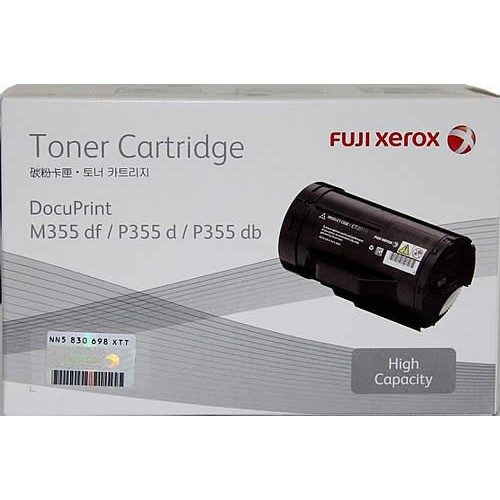
Fuji Toner is a complete solution for many Fuji and other compatible printers. It’s high-quality results sets benchmark for in printing industry. Therefore, people all over the world widely accept its toner to meet their office printing needs. If you are the one who wants to plan for purchase Fuji Xerox Toner. Let’s go for more details about this brand.

Features of Fuji toner

1.Best Design Model

Fuji toner cartridges are designed after many years of research works. Therefore, most of its models present really cool results and goes best with another printer model. For example, Xerox CT202265 Toner Cartridge is an optimum solution for Fuji Xerox printer models such as CP115 w, CP116 w, CP225 w, CM115 w, and CM225fw. So, while searching for all printer models solution, the answer will be the same.

2. High-quality Print Let You Feel Proud

Fuji toner is a quality solution for a laser printer. You will feel proud of high-quality results in investors meetings. In addition, quality printouts also help you to score well in school assignments and creating reports. While buying a cartridge the durability of the printed documents also matters. Therefore, people stop at Fuji toner for the best shopping experience.

3. Consider The Environment

Everyone loves to choose eco-friendly products. So, choosing a Fuji, one can proudly say that he/she has shaken hands for environment safety.  Because Fuji always produces renewable resources and repurchase its own cartridges for recycling. Environment safety is the primary responsibility of everyone. You can also participate in this.

4. Reasonable Rates

There is a wide range of Fuji toners in the market. You can choose any one depending upon the requirement. If you choose online shopping as a mode of buying, you will get a number of options available under the same umbrella. Fuji is an expert in offering a wide range of toners at most affordable rates.  

5. Best For All Types of Printings Needs

Fuji toner is a master for delivering in all types of printing requirements. You can buy it to meet your text documents to images printing required. Simply the model varies, but the solution for every type of printing is present here. In addition, due to the durability feature of the printer results, its results never going to fade away from your memories. Irrespective, natural calamities arise.

6. Page Yield capacity

Page yield capacity means the number of pages a toner cartridge can print. Here, the Fuji is leading the printing industry. Because Fuji toners are created with premium-quality consumables. That helps them to deliver a large number of printed pages. The minimum capacity for the cartridge is 1400 pages above discussed Fuji Xerox CT202265 Toner Cartridge. But it can go with other models.

Some Rules to Follow

Once you end-up your shopping with new Fuji Xerox toner cartridge, it’s good to be aware of a couple of points. Let’s discuss them:

  • Before installing a new cartridge, it’s good to shake it. This will help the toner to lose which goes compact during shipping.
  • Before, disposing of your cartridge, it is essential to check it. Sometimes the toner may be present in the cartridge. It needs only shaking to get refreshed. This step can even deliver you 100 pages printouts.
  • While installing a new cartridge, be careful and never force the machine for installation.
  • If you really care about print quality, along with Fuji toner always use good quality paper described by the manufacturer.  
  • While printing, always uses a smaller size font. This will help in saving toner.
  • OEM always suggests for checking the print preview before giving any command.  
  • Chunky fonts and bolds consume large ink. So, while delivering a print command. Try to avoid these types of text. This will boost the life of your cartridge.

5 Affordable All-in-one Printers For Office Use

With the rapid development of technology, the majority of the business meetings get started finalised on the basis of soft copies. Investor’s meetings can also be arranged via projectors. But, finally, businesses cannot rely solely on cloud computing. They need to scan, fax, copying and print documents to keep safe records. Therefore, an all-in-one printer is the only solution to improve their productivity. But, finding an adequate printer can be critical that can fit into every business budget. In order to help you, here we have 5 affordable printer solutions for your office needs.

1.HP LaserJet Pro MFP M125rnw ($185)

The HP LaserJet Pro MFP M125rnw is the fastest solution for the black and white print users. Basically, this model is multi-functional with copier and a scanner composition. But this device is an ideal solution for small office needs. This model can print with a speed of 20 pages per minute with a print resolution of 600x600dpi. Basically, it is designed for 8000 pages per month and the resources in the cartridge can print 1500 pages.  There is an Ethernet port connectivity required that will allow you to make a network device from the MFP. A wide range of customers appreciate its high print quality and functionality like wi-fi and mobile connectivity. In addition, to get premium quality output, its manufacturer recommends to use only HP toner only.

2. Kyocera FS-1370DN ($ 280)

Kyocera FS-1370DN is an amazing solution to meet medium size offices needs. It has the capacity to print more than 50000 prints per month. This model can print 35 pages per minute with a print resolution of 1200x1200dpi. Its photo drum resources have a capacity of 100000  pages and black cartridge can go for 7200 pages. There is also an “economical printing mode” that can greatly reduce the cost of prints per page. In addition, after the toner in the cartridge runs out, there is no need to replace it every time as it can be refilled. Considering its great features and attractive price, it is very difficult to find a similar model printer.

3.  HP Officejet Pro 8610 e-All-in-One ($ 210)

This is a multifunctional device with a scanner, copier and printer functions. But, it is distinguished by inkjet technology and at a resolution of 1200×1200 dpi. The printing productivity is 30,000 pages per month, which allows you to print up to 1000 pages per day. The device is equipped with black and colour cartridges that contain a resource of 1000 and 700 pages. There is an Ethernet port and the possibility of wireless connection via Wi-Fi. So, together with high performance, the availability of an Ethernet port makes the model suitable for the office. The device quickly and efficiently prints documents and does not dry when kept idle for some time.

4. Canon i-SENSYS LBP7110Cw ($127)

This Canon printer model is a great solution for high office printing needs. Considering the fact that the laser technology of colour printing is used here, the cost of model is really good. This is also one of the cheapest printers with colour laser printing technology. There is an ethernet port, wi-fi connectivity features available in this model. This model can print with a speed of 14 pages per minute and a resource can deliver 1400 black & white and 1500 pages of coloured documents. However, in general, it is a great model for a small office.

5. Canon Pixma TS9120 ($59.49)

Canon Pixma TS9120 is the best-in-class all-in-one printer. The greatest feature of this model is that it can deliver print speeds and excellent print quality for both text and photos. This requires six individual ink colour cartridges to deliver you the high-quality printed documents. It is designed by considering small office needs. This all-in-one printer can solve your printing, scanning or faxing function. In addition, it supports ethernet, wifi networking and wireless printing with Google cloud and Apple AirPrint. This can conveniently work with window and Mac operating system.

Bottom Line

Hope, the above five suggestions help you to choose the most affordable printers as per your office requirements. Remember, in offices, you need to take lots of print outs per day. Therefore, while deciding a printer, it is better to consider its printer cartridges resources, print quality, and connectivity features. It will help you take prints from anywhere.